What is an AI agent harness? OpenClaw, Hermes Agent and Codex explained
Learn what an AI harness adds to a model, how tools, memory and permissions turn a request into action, and how to compare agent environments for your task.
Guide by the Otomatzia editorial team · source content checked on
What does an AI harness do?
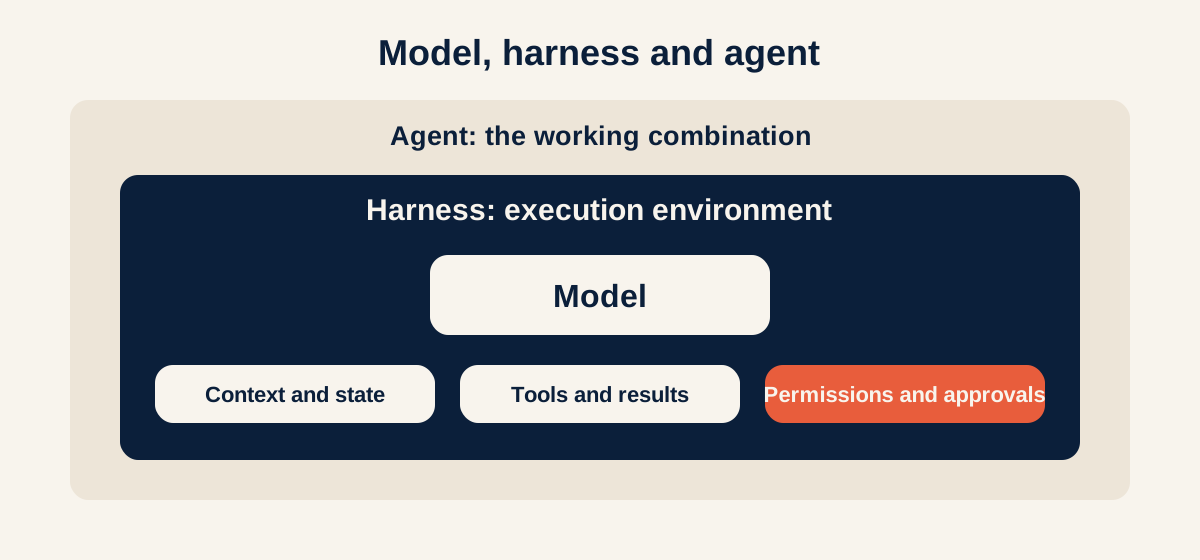
An AI harness is the software layer that manages a model's work with tools, information and permissions. It supplies the context the model needs, runs the tools the model requests and returns their results so work can continue. This makes it possible to build an agent around a model that carries out a task through several actions.
When choosing an AI tool, the model's name is only part of the picture. Check which systems it connects to, how it maintains continuity and which actions require approval. These differences help explain what environments such as OpenClaw, Hermes Agent and Codex offer, and how to choose between them for a particular task.
Model, agent and harness: what is the difference?
A language model receives input and produces output. That output may be an answer, code or a structured request to use a tool. For such a request to open a file, run a test or read data from a business system, other software must carry it out and return the result to the model.
That is the harness's job. It manages the cycle between the model and its working environment, maintains conversation state and applies the configured tool and approval policies. The Claude Code documentation and OpenAI's article on Codex as a platform explicitly describe this execution layer.
The word harness also describes equipment that connects and controls movement. Here, it describes the system connecting a model's capabilities to the environment where work needs to happen. Harnesses do not all have to provide the same capabilities, and the term is used for software layers of different scope.
For more on agents, see the AI agent definition. This distinction is especially useful when comparing products: a model's name alone does not tell you which actions it can take.
| Concept | Role | Example |
|---|---|---|
| Model | Interprets the request and chooses what to propose or request next | A model from the Claude or GPT family |
| Harness | Manages context, tools, task state and execution policy | The execution layer of Claude Code or Codex |
| AI agent | The working combination of a model, execution environment, instructions and tools for a task | An agent investigating a fault and attempting a fix |
| Tool | An action that software makes available to the model | Reading a file or searching a system |
How does a harness turn a request into action?
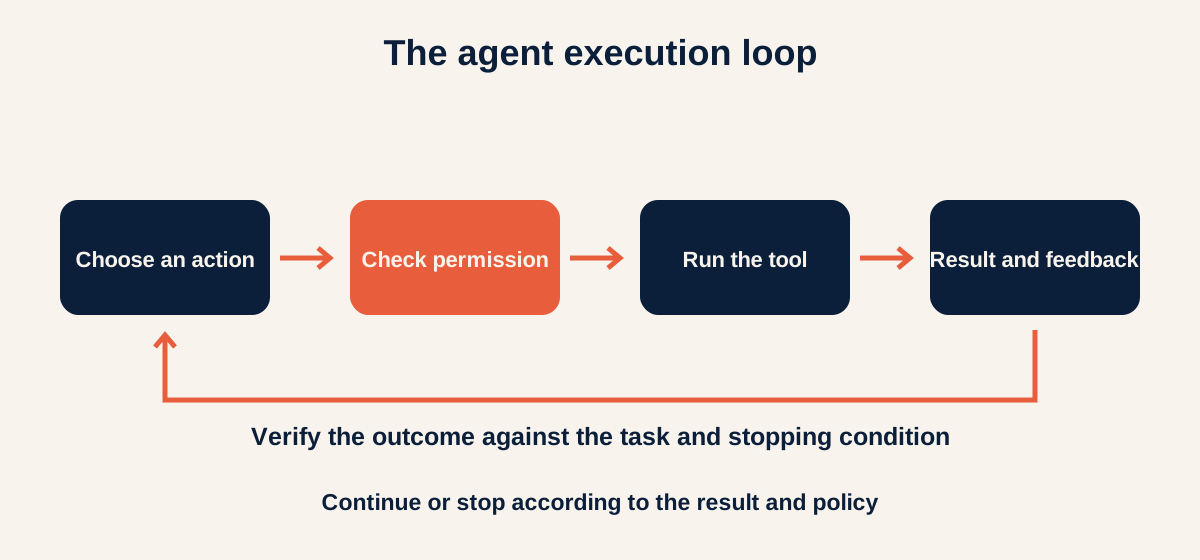
Suppose you ask an agent to find a bug in a project, fix it and run the tests. To complete the task, it needs tools, an execution loop, context and permissions. Some environments can also use subagents. Together, these capabilities let the agent move beyond its first answer.
Tools: the model requests, the software executes
The model might ask to read a particular file. The harness receives that request, checks it against policy and runs the tool if the action is allowed. The file's contents return to the model, which can use them to choose its next action.
The practical distinction is between a suggestion and an action: a sentence recommending that a file be checked is not evidence that it was checked. The environment should let you see which action was requested and what it returned.
The execution loop: each result informs the next step
After reading the file, the model can request a change and run a test. If the test fails, the result returns to the model and it can attempt another fix. The harness manages the sequence of requests, results and further conversation.
This is a cycle of choosing an action, executing it and observing the result. To be useful, the cycle also needs a clear stopping condition and resource limits. Without them, the agent may repeat an attempt that does not solve the problem.
Context: choosing what information reaches the model
Context can include the request, project instructions, parts of the conversation and tool results. The space available for this information is limited, so the environment must manage it: selecting relevant information, finding more information or summarizing earlier material.
Memory across conversations is a capability to check in the environment you choose. Information from earlier conversations can be stored and retrieved through memory mechanisms. For the model to use it in the current request, the system must make it available.
Permissions: deciding which actions are allowed
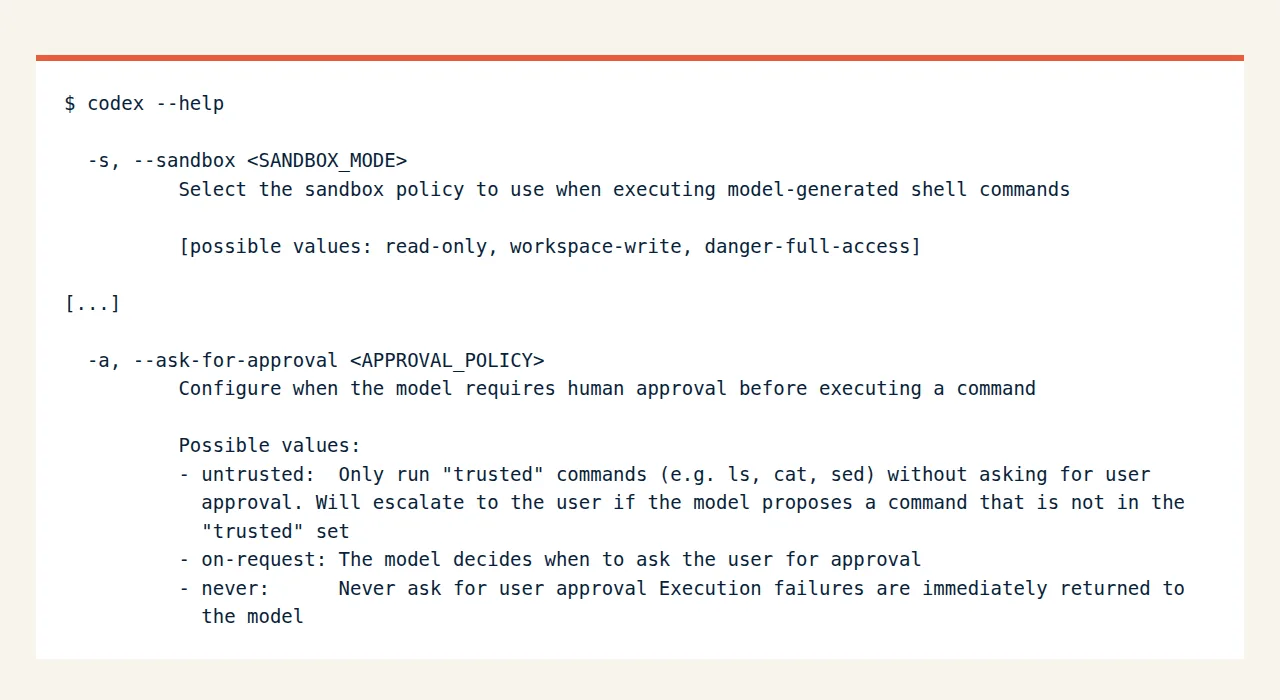
A tool can be available to a model while particular actions still require approval. In OpenCode, for example, permission rules can allow an action, ask for approval or block it. The actual configuration determines how the policy works.
A written instruction such as 'do not delete files' does not impose the same restriction as blocking an action in software. Even a permission rule enforced by a harness does not, by itself, demonstrate operating system isolation. A sandbox can restrict access to files, networks and processes, depending on the product and its configuration. When choosing an environment, check what each layer enforces and when the agent stops to ask for help.
Subagents: dividing work with focused context
Some systems can hand a subtask to another assistant, such as searching code or reviewing a change. Claude Code documents subagents that work in their own context windows and can receive defined tools and permissions.
This can keep search details out of the main conversation and return a focused result. However, dividing work adds model calls and coordination between tasks. Use it when a subtask can be defined and checked independently.
Why can the same model perform differently in different environments?
A model works with the information, tools and feedback it receives. An environment that supplies the right file and a clear test result gives it a different basis for making a decision than one where that information is missing. A difference in results can therefore come from the software around the model too.
In an example reported by LangChain in February 2026, its coding agent's Terminal Bench 2.0 score rose from 52.8% to 66.5%, an improvement of 13.7 percentage points. The company reported that the model remained GPT-5.2-Codex and that changes were made to the harness, including instructions, context and verification mechanisms.
The report describes a useful failure to understand: the agent wrote a solution, read the code again and decided to finish without actually testing it. The team added instructions and feedback directing it to run tests and compare the result with the task requirements.
This is the company's report of one particular experiment. It does not promise the same improvement for every business, and it is not a ranking of the products below. It illustrates why evaluating an agent should cover both the model and the environment running it.
OpenClaw, Hermes Agent, Codex and others: what does each add?
These products illustrate different uses of the harness concept. Some are general assistants with memory and connections to communication channels, while others focus on working with code. The table describes capabilities according to each product's official documentation and publications. It is not the result of a comparative test conducted here.
The name Hermes needs clarification: here it means Hermes Agent, the agent product from Nous Research. The company also uses Hermes for models, so check whether a discussion concerns the model or the software running it.
When choosing Codex or Claude Code, the product and the model are separate questions too. The harness determines which working mechanisms are available, and you choose a model from the options it supports. Changing the model does not necessarily replace the execution environment.
| Environment | What it illustrates | What to check in a demonstration |
|---|---|---|
| OpenClaw | An agent environment with an execution loop, tools, instructions, workspaces and conversations | Which context is loaded for each agent and which tools it may use |
| Hermes Agent | An assistant from Nous Research combining tools, persistent memory and reusable skills | What is stored in memory and how a skill created during work is checked |
| Codex | An agent environment with conversation management, tools, sandbox and approval policies, plus components for integration into applications | Which actions run, which require approval and how a task is resumed |
| Claude Code | A coding environment with tools, context management and an action and verification cycle | Whether a change is checked against the original request and what is handed to a subagent |
| Gemini CLI | A terminal environment with file management, commands, search and extension tools | Which tools and connections are available in your chosen installation and configuration |
| OpenCode | A coding agent connecting to different model providers, with tools and permission rules | Whether changing the model preserves work quality and the policy you configured |
How do you choose a harness for your task?
Start with an outcome you can check. 'A smart assistant for the business' does not define success. 'Read the flagged inquiries, collect approved information and prepare a draft reply' defines work. This is a hypothetical example that you can adapt to your own process.
Now check what is needed around the model. Is there a tool for reading the inquiries? How does it know which information is approved? Is progress saved? What happens if the system it reads data from is unavailable?
When comparing options, try to keep the task and test data identical. If the model, permissions and available information all change, it is hard to identify the reason for a difference. The guide to maintaining automations can also help you plan how to spot a stalled process.
- Define the outcome: write down what should be ready at the end and how you will check it.
- Define information and tools: list the sources needed and the actions allowed in each.
- Define memory: decide what needs to be kept for later and what is relevant only to the current task.
- Define approvals: decide when the agent can continue and when it must stop.
- Test a deliberate failure: supply incomplete input or block a tool and check whether the explanation helps you continue.
- Check the result: open the file or record created and compare it with the original request.
Common mistakes that obscure what actually works
The first mistake is attributing every weak answer to the model. Before replacing it, check whether it received the right data and whether its tools returned useful information. A well-organized harness still does not remove the model's limitations or guarantee that every decision will be correct.
Another mistake is confusing memory with training. For example, Hermes Agent's persistent memory stores information the agent can receive in later conversations. Saving a note or a skill does not, by itself, change the language model's weights.
The number of tools is not a sufficient measure of quality either. A suitable tool returns information the model can act on; a long list of unfamiliar tools can add choices without meeting a need. The practical question is which tools the task requires and how their results will be checked.
Finally, an MCP connection, a skill and a harness serve different roles. MCP provides a way to connect to tools and information sources. A skill supplies instructions or material for a type of work. The harness manages their use within the task. The MCP definition explains the connection layer in more detail.
Frequently asked questions
These answers clarify what a harness provides and what still needs to be checked in your chosen environment.
Is a harness simply a long prompt?
No. A prompt can be part of a harness, but the execution environment also includes code that runs tools, maintains state and manages approvals and results. Precise instructions help the model choose an action, but they do not operate an external system by themselves. When evaluating a product, ask to see its actions and their results alongside the text the agent wrote.
Do I have to install OpenClaw or Hermes Agent to use an agent?
No. These are examples of environments that run agents. You can work with a coding environment such as Codex or Claude Code, or use an agent integrated into another product. The choice depends on the task, required connections and permissions. Answering within a conversation and fixing a software project may lead to different choices, even if a similar model can be used.
Can the same model be used in several harnesses?
Yes, when the environments and access providers support it. You still need to check each product's support, access terms and settings. Even with an identical model, the instructions, tools and context may differ. Such a comparison can teach you about the execution environment, but record what stayed constant and what changed between attempts.
Can an agent with memory and subagents work unsupervised?
These capabilities alone do not guarantee reliable unsupervised work. Define the task, permissions, stopping conditions and failure handling, then check the outcome. Memory can support continuity and a subagent can focus work, but both still depend on the information they receive and the quality of execution. Start with a defined task before expanding responsibility.
What to check in your first harness experiment
Download the harness evaluation checklist. Choose a defined task with sample data and an outcome you can open and inspect. For a general framework for preparing a first workflow, use the first automation checklist. To assess whether the environment fits your process, record the following points.
- Which information reached the model and which information was missing.
- Which tools ran and what each returned.
- Which actions required approval and what was actually enforced.
- How the agent responded to failure and where progress was saved.
- Which evidence shows that the outcome meets the original request.
Sources to check next
- Claude Code: how Claude Code works
- OpenAI: Codex as a platform
- OpenCode: permissions
- Claude Code: subagents
- LangChain: improving deep agents with harness engineering
- OpenClaw: agent concepts
- Nous Research: Hermes Agent documentation
- Gemini CLI documentation
- OpenCode documentation
- Hermes Agent: persistent memory
Vendor features and prices change. Confirm details on the linked official pages before you rely on them.
What to read next
- Your first business automation: a checklist
- Automation monitoring checklist: verify completed work
- n8n: automation features and setup