n8n staging production triggers: A practical isolation guide
Control n8n staging production triggers before testing. Audit schedules, webhooks, credentials and demo destinations, then record evidence and exceptions.
Guide by the Otomatzia editorial team · source content checked on
After this copy or Git pull, which triggers are actually live?
Inspect the destination instance's publication state and registration evidence before allowing execution. A copied workflow, an inactive import setting or a successful Git pull does not answer every question about what can run or where it can write.
The starting point for this guide is the credited community staging-trigger suppression proposal. Its author proposes reviewing published staging workflows for timed or polling triggers, reporting proposed changes and allowing named exceptions before unpublishing. That is a practitioner's proposal, not official n8n documentation or independently verified adoption evidence. This guide builds a broader review around entry points, destination authority and observed effects.
The outcome is a documented entry point inventory, destination mapping and decision for each proposed test. The product facts come from the cited official documentation, with source records dated September through November 2, 2026. Our separate synthetic local rehearsal is identified by the controlled input isolated-20261104. Neither source category establishes every installation's behavior.
The cover illustrates the review boundary between a workflow and its intended demo destination. It is an illustration, separate from the real editor and execution captures discussed below.
A trigger definition is not a live registration
Keep three questions separate: is an entry point defined, is it registered to receive events, and has an execution occurred? For example, n8n documents separate Test and Production webhook URLs, with production webhook operation requiring a saved and published workflow. Seeing a Webhook node alone does not establish either listener's current state. Official n8n documentation: Webhook workflow development.
This guide uses publish and unpublish terminology because n8n's CLI documentation says that model replaced the active and inactive toggle in n8n 2.0. Older 1.x instructions may say active or inactive, and import options still refer to an exported active field. Record the installed version and inspect its actual state rather than treating those terms or fields as interchangeable evidence. Official n8n documentation: Use the command line.
A staging label is not destination isolation
Treat names such as staging, demo and test as labels to verify. A full backup can carry credential material, while Git transfers credential and variable stubs without synchronizing their values. Neither transfer method proves which external account a workflow will use. Official n8n documentation: Back up and restore, Official n8n documentation: Work with environments.
Before starting, arrange permission to inspect publication, registrations, credentials and destinations. Record the version, deployment mode and transfer method. Have a recoverable export or copied database snapshot, distinguishable demo resources, read access to execution and destination evidence, and an owner for unresolved provider questions or intentional exceptions. Do not initiate real customer messages, payments or production writes to gather evidence.
Choose the procedure that matches your transfer
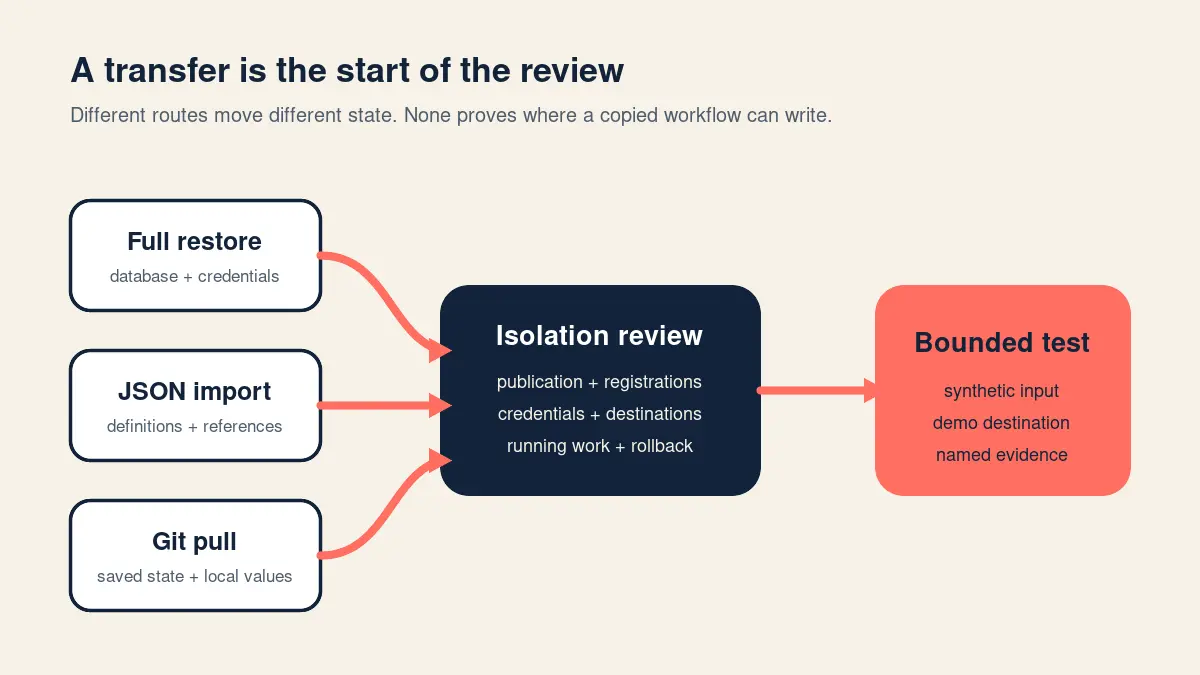
Identify what moved before choosing a containment procedure. The following transfer map is a planning aid, not observed runtime evidence.
The backup and import distinctions come from Official n8n documentation: Back up and restore. The Git contents and environment model come from Official n8n documentation: Work with environments. Republishing during a pull is documented in Official n8n documentation: Push and pull changes.
The Server CLI route requires access to a self-hosted installation. Built in source control and environments is documented for Business and Enterprise plans. The official tutorial uses separate development and production instances, with corresponding branches in its multiple-branch setup. It also says a push transfers the current saved workflow version, not the published version, and describes publishing separately on the remote server. That does not override the documented republishing behavior when pulling changes into an already published workflow. Official n8n documentation: Use the command line, Official n8n tutorial: Environments with source control.
For a practitioner perspective, watch DailyAi.Studio's How I Deploy N8N Workflows & Lessons Learned, starting at 02:45.
Starting at 02:45, the presenter discusses separate staging and production environments from personal deployment experience. The public video, transcript segment and thumbnail were verified for this guide on November 4, 2026. This third-party perspective does not establish universal n8n behavior or replace official documentation and bounded rehearsal evidence.
| Transfer route | What travels | What may execute | First control | Unresolved conditions |
|---|---|---|---|---|
| Full instance restore | A complete self-hosted backup includes application data and, when PostgreSQL is used, the external database. It can retain credential material. | Treat restored publication and registrations as requiring inspection before startup. Also review direct execution. | Keep the copied service stopped, verify the staging database target and rollback snapshot, then address publication against that copy. | Credential authority, provider registrations, callbacks, writable destinations, and relevant queued or running work. |
| CLI JSON import | Exported workflow definitions and references. The documented default deactivates imported workflows. | Review the dated cron import caveat and any direct execution path before relying on inactivity. | Retain the inactive import default and resolve the installed mode and restart requirements. | References, destination values, the documentation's mode qualifications, and existing work that might still execute. |
| Built in Git source control | Saved workflow copies, tags, credential stubs and variable stubs. Credential and variable values are not synchronized. | Pulling into an already published workflow unpublishes it during the pull and then republishes it. | Review affected dependencies before the pull, then inspect the resulting publication state. | Existing publication, instance-specific values, provider registrations and indirect execution dependencies. |
Contain execution before startup, import or pull
Before any startup, import or pull that can activate or republish an affected workflow, resolve its credential scope, callback ownership, provider registrations, writable destinations and indirect execution dependencies. An unknown dependency blocks that operation itself. It is not sufficient to promise to inspect it before a later manual test.
Also establish whether relevant executions are running or queued. The evidence supporting this guide does not establish how every deployment handles that work during these operations. Where that uncertainty matters, stop until the installation's behavior is resolved. Do not assume unpublishing cancels work already in progress.
A restored database
Keep the copied service stopped while preparing containment. Before any bulk publication change:
n8n documents a bulk unpublish operation for all workflows. Its Server CLI can perform most commands while the service is stopped through direct database access. The target check is essential: the same bulk operation against production would unpublish production workflows. Official n8n documentation: Use the command line.
The same documentation says publication changes are checked every 15 seconds by default when the default publication service is enabled, and changes made while n8n is stopped apply at startup. That timing is not permission to start an unresolved copy and clean it up afterward. A later state change cannot close an earlier interval in which execution was possible.
Our documented containment practice is to preserve a workflow export before deactivation and avoid test-running a workflow that can send. That is our operating practice, separate from official product behavior.
- Confirm that the database connection targets the staging copy.
- Confirm that a recoverable rollback snapshot exists for that copy.
- Have the operator responsible for the installation perform the intended unpublish operation against the verified copy.
- Read back publication evidence before proceeding to startup, with the dependency review complete.
An imported workflow
Retain the documented inactive import default. Do not restore exported active state merely to make staging resemble production. The CLI page describes --activeState=false as the default and limits fromJson to multi-main mode. The backup page describes fromJson as available in queue or multi-main mode. Keep that difference visible and resolve applicability for the installed version and mode before using an exception. Official n8n CLI import documentation, Official n8n backup and restore documentation.
The CLI documentation recorded on October 12, 2026 also describes a known import bug: on multi-main and queue-mode instances, cron triggers from previously active imported workflows are deactivated; on non multi-main instances, those cron triggers remain running until the n8n instance is restarted. Preserve those stated mode qualifications. For the documented non multi-main case, include a restart before relying on the imported state, after the startup prerequisites are satisfied. Do not generalize this caveat to every trigger family or resolve unclear mode applicability by guessing. Official n8n documentation: CLI import caveat.
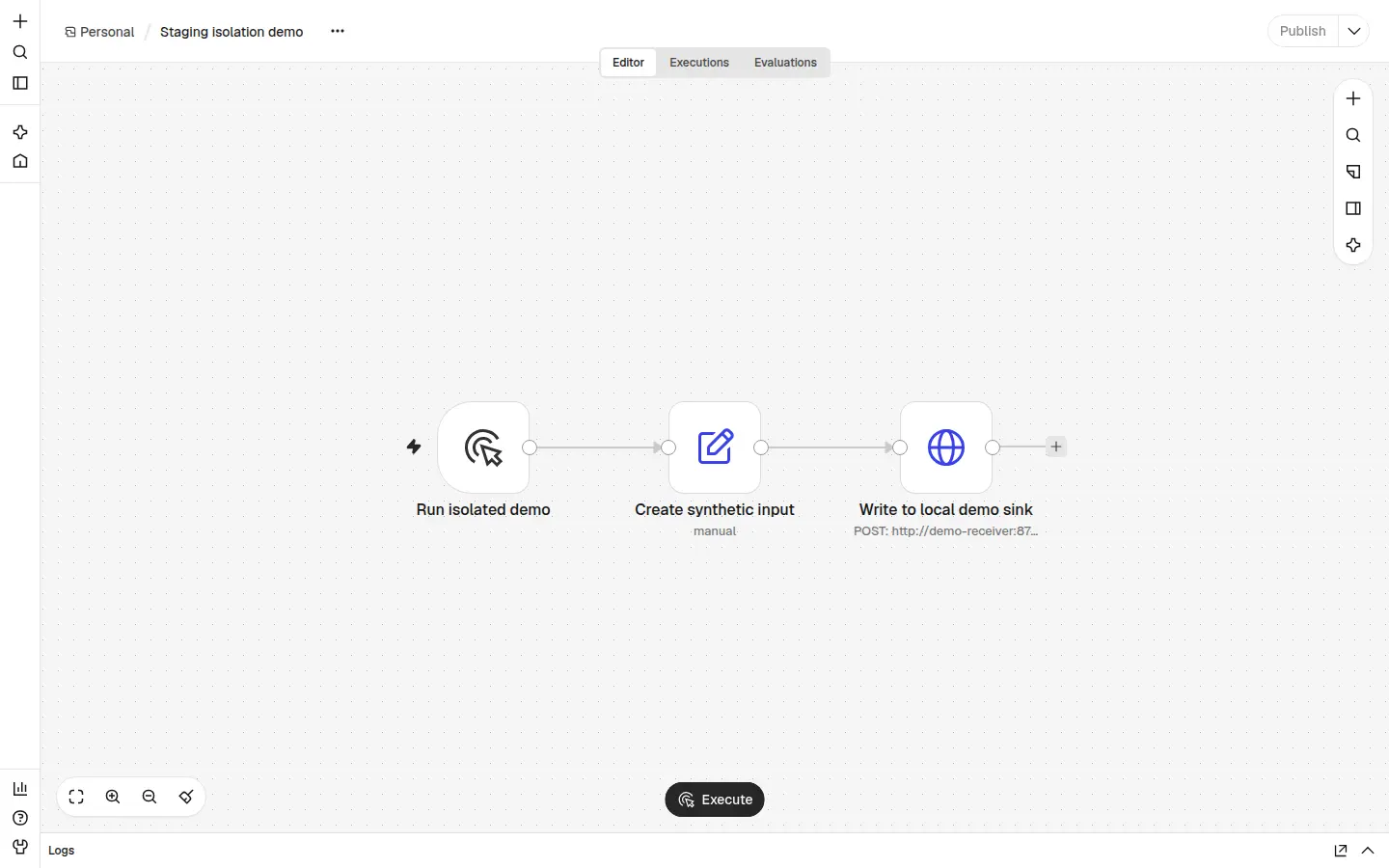
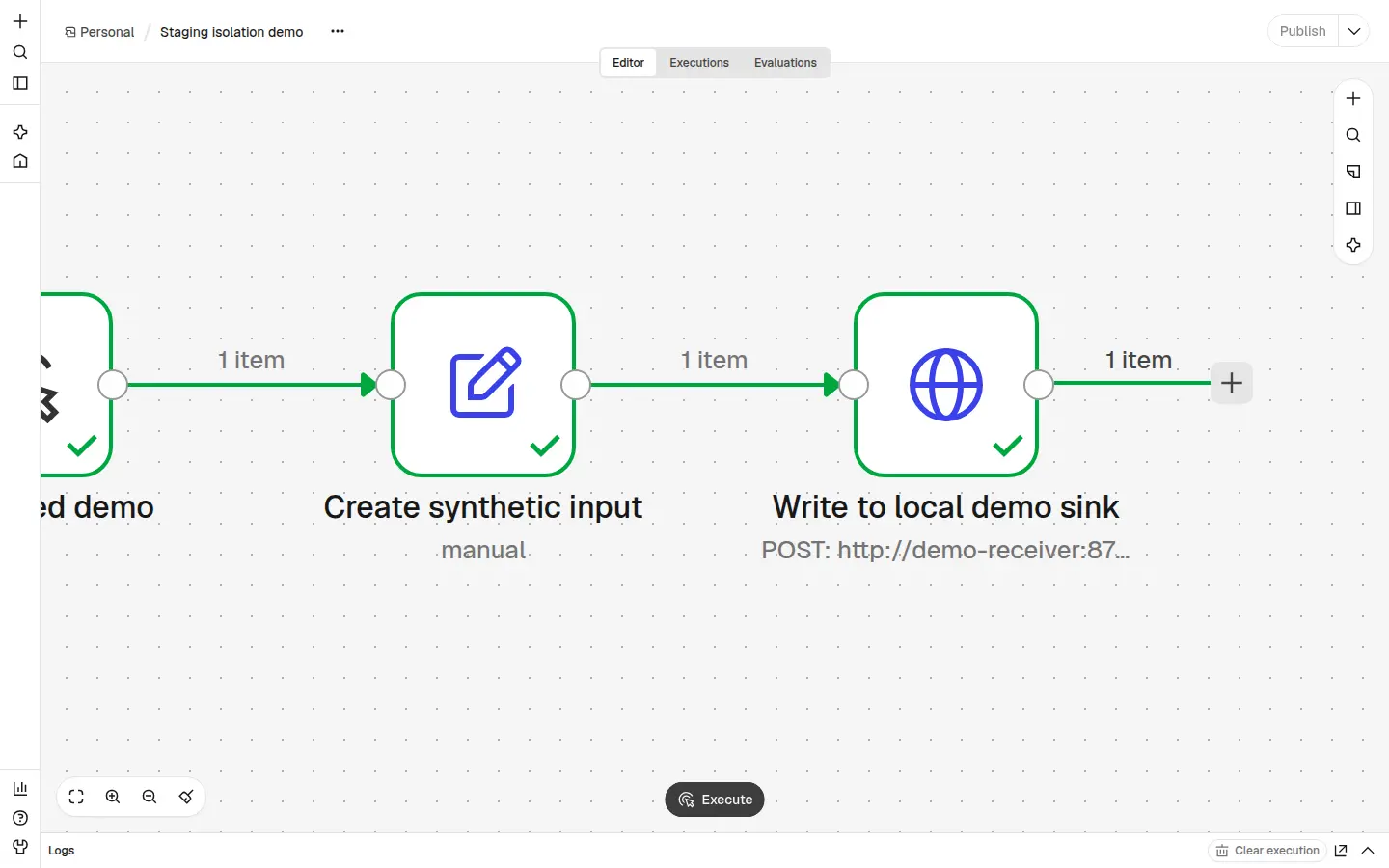
The accompanying real editor capture shows our synthetic workflow after CLI import into local n8n 2.45.7. The visible Publish control records its unpublished state in that instance. This observation comes from the UI, not an inference from an exported active field.
A source control pull
Complete the dependency review before pulling into an affected published workflow. The documented pull behavior includes republishing, so the pull itself belongs inside the execution review. Afterward, inspect publication and registrations again and record the resulting state. A successful pull is evidence of a transfer, not a completed isolation review. Official n8n documentation: Push and pull changes.
Inventory entry points and their observed state
Create a separate row for each entry point in each affected workflow. The rows below are prompts for an inventory, not observations about your instance. Duplicate them when a workflow has several entry points.
| Workflow identity | Trigger family | Definition present | Publication state | Registration evidence | Destination | Owner | Unresolved question |
|---|---|---|---|---|---|---|---|
| Record workflow identifier and reviewed version | Schedule | Record what is defined | Inspect and date | Record applicable evidence | Map actual writable resources | Name reviewer | Timezone, registration or timing unresolved? |
| Record workflow identifier and reviewed version | Polling | Record what is defined | Inspect and date | Verify applicable behavior | Map actual writable resources | Name reviewer | Provider behavior unresolved? |
| Record workflow identifier and reviewed version | App event | Record what is defined | Inspect and date | Identify registration and callback owner | Map actual writable resources | Name reviewer | Shared account or callback unresolved? |
| Record workflow identifier and reviewed version | Webhook | Record what is defined | Inspect and date | Distinguish Test and Production listener evidence | Map downstream resources | Name reviewer | Which listener is registered? |
| Record workflow identifier and reviewed version | Direct execution | Record the executable saved workflow | Inspect and date | Record the execution path; registration may not apply | Follow every writable branch | Name reviewer | Unreviewed references or callers? |
Definitions, registrations and executions
A definition describes the configured entry point. Registration evidence addresses whether the relevant listener or provider connection is established. Execution evidence addresses what actually ran. Keep all three records rather than letting one stand in for another.
The distinctions matter because a source control pull can republish a workflow, a webhook has documented listener requirements, and the Server CLI can execute a saved workflow directly by ID. Official n8n documentation: Pull behavior, Official n8n documentation: Webhook development, Official n8n documentation: Direct CLI execution.
Unknown is a result that blocks the relevant test
Do not infer provider behavior from a node's name. Write the missing evidence as a question with an owner: which account owns this registration, which callback receives events, or which saved workflow can this entry point invoke?
Use unknown when the answer is unavailable. Use not applicable only with a recorded reason. Neither an empty cell nor the absence of a recent execution proves an entry point is isolated.
Map every writable destination to a demo resource
Review where execution can write before providing input. For each writable action, connect the workflow's reference to a verified demo resource that the reviewer can distinguish from production.
Identify the account behind the credential
Record the credential reference, the account it actually authorizes, its relevant scope and the evidence establishing that account. Keep secrets out of the worksheet. A label such as demo credential is insufficient.
A restored backup can retain the material needed to use copied credentials. Git's omission of credential values does not establish that the destination instance holds safe values. Review the values and authority on that instance. Official n8n documentation: Back up and restore, Official n8n documentation: Work with environments.
Resolve variables and computed destinations
Follow each destination expression to the actual demo account, recipient or endpoint. Record the relevant instance variable values and the input conditions used to resolve computed destinations. If a different permitted input could select another destination, review that branch before including it in the test's scope.
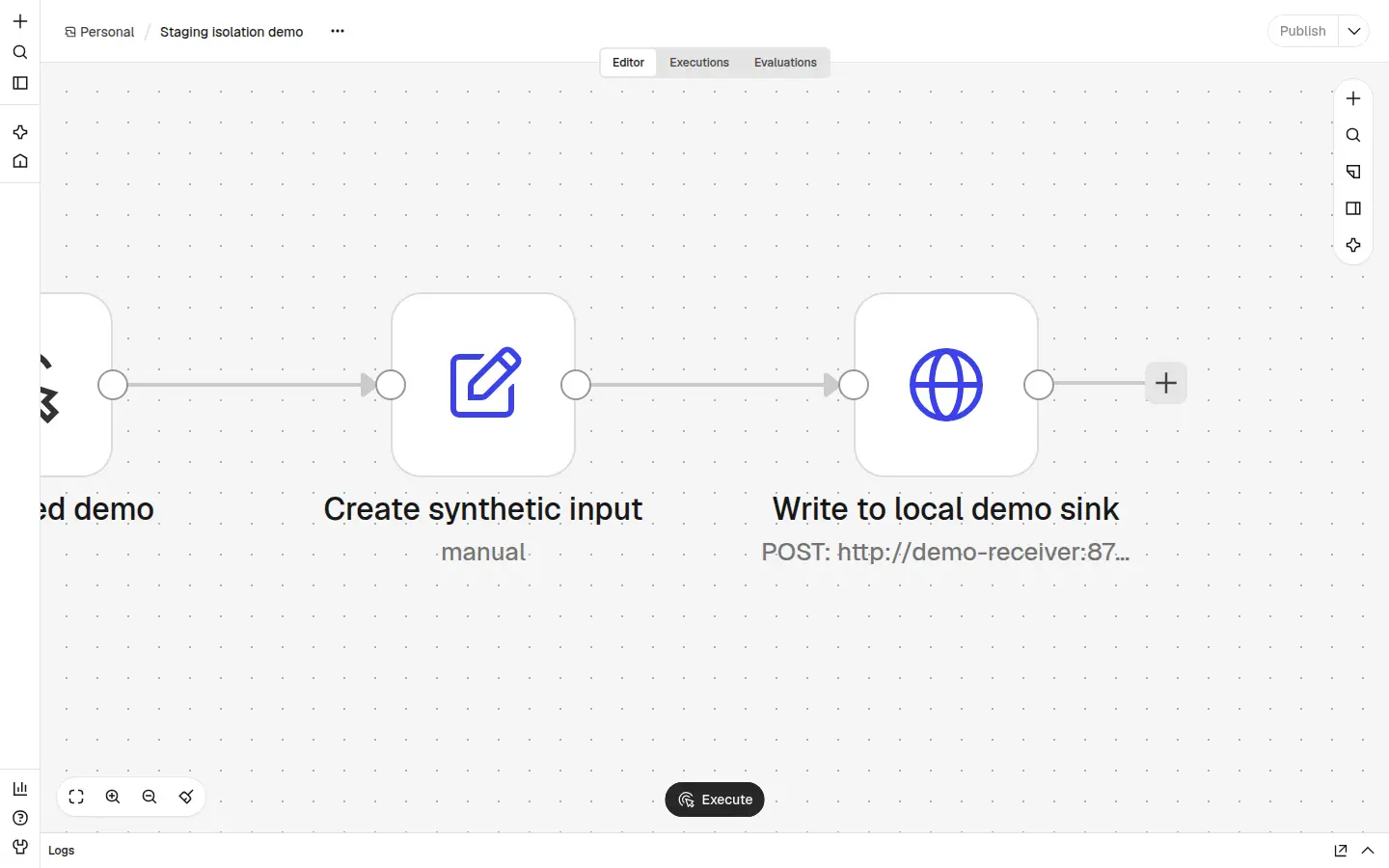
Include HTTP actions and references that need further inspection. A node with no credential still needs a destination review. In our local rehearsal, the HTTP node used no credential and pointed at a private synthetic receiver. The editor capture establishes the configured destination for that setup; separate receiver receipts establish the observed deliveries.
Record missing mappings
If the reviewer cannot identify the account behind a credential, resolve a destination expression or inspect a referenced action, record the gap and block the affected test. Assign the next check to someone who can obtain the evidence. Do not substitute a plausible demo label for a verified mapping.
Separate webhook listeners from write permissions
What the test listener changes
According to the official webhook development documentation, each Webhook node has a Test URL and a Production URL. Selecting Listen for test event registers a test listener that remains active for 120 seconds. Production webhook operation requires the workflow to be saved and published; external calls to its Production URL then run the workflow automatically. Official n8n documentation: Webhook workflow development.
For the documented development flow, use the Test URL deliberately within its listener window. Record which URL type the sender uses. Keep an external service disconnected from a staging Production URL until publication is intentional and the affected dependencies and downstream destinations are resolved.
What still needs destination evidence
Listener selection answers how an event enters. It does not identify the account or recipient used by the subsequent actions. Complete the same destination mapping before sending a test webhook as before manually executing the workflow.
The official credential documentation lists Basic, Header and JWT authentication, plus None. Those settings concern access to the webhook. They do not establish that downstream writes target demo resources. Record listener evidence and destination evidence separately. Official n8n documentation: Webhook credentials.
Check schedule timezones without assuming a default
The official settings documentation gives this chain for Schedule Trigger: it uses the workflow timezone, falls back to the instance default, and names New York with EDT as the fallback when neither is configured. Record that documented chain without substituting an assumed container timezone. Official n8n documentation: Workflow timezone settings.
For each schedule, record the workflow timezone setting, the instance timezone setting, the effective timezone you have established and the intended schedule on staging. Distinguish a value you inspected from a fallback you merely expect. If the effective timezone remains unclear, leave the schedule test blocked.
Choose the observation period from the configured interval, recorded timezone and relevant registration evidence. An idle period cannot establish that a future scheduled event will target demo resources, and there is no universal number of hours after which the worksheet becomes complete.
Resolve app registrations and shared accounts
Provider-specific registration replacement, callback collisions and shared-account behavior were not verified in the evidence supporting this guide. Do not turn that gap into a universal rule about how app triggers register or coexist.
Complete this decision table separately for each provider used by the workflow. It is a review template, not a record of verified provider behavior.
The owner must establish whether the proposed staging action affects an existing production registration or callback, and what recovery would require. Obtain that evidence without experimenting on an unresolved production account.
A shared production account, unclear callback destination or unknown registration effect blocks that provider's test. If startup or pulling can activate the dependency, the same gap blocks that operation. Git stubs do not resolve these account questions because credential and variable values are not synchronized. Official n8n documentation: Work with environments.
| Provider | Demo account | Registration owner | Callback destination | Replacement or collision behavior | Evidence | Test status |
|---|---|---|---|---|---|---|
| Name the provider being reviewed | Verify the actual account | Identify who controls registration | Verify the intended demo callback | Unknown until supported for this provider and setup | Record the source and installation evidence | Blocked until relevant unknowns are resolved |
Trace indirect execution and write paths
Direct execution still needs review
n8n documents direct Server CLI execution of a saved workflow by its ID. Therefore, unpublishing alone does not establish that no one can execute the workflow. Review a proposed direct execution against the same destination boundary as any triggered run. Official n8n documentation: Use the command line.
Keep publication evidence and execution approval separate. Copied credential material also needs review regardless of which entry point initiates the action. Official n8n documentation: Back up and restore.
Follow references until the destination is known
Inspect referenced sub-workflows, error workflows and custom code wherever they are present. The official n8n CLI documentation establishes the direct execution path by workflow ID; it does not certify every indirect execution path in your installation. Official n8n documentation: Use the command line. Record how each reference resolves and which destinations the referenced logic can reach.
For every branch included in the test, identify its writable destination or record why it has none. If a reference cannot be inspected, keep that path outside the approved test scope. If it cannot be excluded from the proposed execution, the execution remains blocked.
Know what static scans and runtime guards cannot prove
Use static review to find questions, not to certify live isolation. The following distinctions prevent a clean-looking export from becoming an unsupported approval.
The limits follow from the documented publish model, republishing on pull, Git's omission of credential and variable values, and direct execution by ID. Official n8n CLI documentation, Official n8n pull documentation, Official n8n environment documentation.
This review does not supply a universal dry run mode. A proposed guard still needs inspection against the actual entry points and destinations. Do not replace unresolved runtime evidence with a reassuring scan result.
| Check | Useful contribution | What it does not establish |
|---|---|---|
| One exported state field | Records a value in an export | Current publication, registration or running execution state |
| Trigger-like node names | Suggests places to inspect | Complete coverage of entry points or provider behavior |
| Search for a production label | Finds matching text in the reviewed material | Actual credential values, computed destinations or every external write path |
| Runtime condition | Describes a proposed control to inspect | That every relevant execution path passes through it |
Rehearse against demo destinations and record the limits
Proceed only after the entry points and destinations relevant to the rehearsal are resolved. If publication is needed to test a particular trigger, resolve its dependencies before publishing. A manual rehearsal does not stand in for that trigger-specific review.
Define the expected demo effect
Before executing, write down:
In our own local rehearsal, we manually ran an unpublished workflow in local n8n 2.45.7. Each of the two successful runs sent demoInputId isolated-20261104 with scope local-demo-only to a private synthetic receiver. Each run produced one matching destination-side receipt. An earlier host-only sink attempt failed and produced no receipt. These are observations from our bounded synthetic setup, recorded under demoInputId isolated-20261104.
- The controlled synthetic input and the entry point you will use.
- The expected effects at each named demo destination.
- The production effects that are prohibited.
- The observation period and why it fits the configured trigger.
- The evidence available from n8n and from each destination.
- The stop condition and rollback target.
| Local attempt | Controlled input recorded | Observed destination evidence | Limit |
|---|---|---|---|
| Earlier host-only sink attempt | Do not infer its payload from the later successful runs | Failed; no receiver receipt | Did not establish delivery |
| First successful manual run | demoInputId: isolated-20261104; scope: local-demo-only | One matching receipt at the private synthetic receiver | Immediate local observation only |
| Second successful manual run | demoInputId: isolated-20261104; scope: local-demo-only | One matching receipt at the private synthetic receiver | Immediate local observation only |
Inspect the systems you can actually observe
Compare the execution record with destination evidence for the same controlled input. A configured endpoint and a successful-looking screen are different evidence from a receipt at the intended receiver.
Our observation window covered each manual run and its immediate receiver receipt check. It did not establish later behavior, schedule registration, provider callback handling or other deployment modes. The earlier failed attempt remains part of the evidence: later UI state cannot turn that attempt into a delivery.
Our documented practice has also included pinning outbound HTTP nodes while verifying Code node logic without calling production services. Treat that as a constrained logic check. Do not assume pinned data protects every execution mode, and do not count a check that avoids delivery as destination receipt evidence.
Stop when the evidence is incomplete
Stop if the destination is unknown, registration behavior is unresolved, an expected receipt is missing or the intended audit view is unavailable. Record what failed and which systems were visible. Investigate before rerunning; an unexplained result does not justify widening the test into production.
If you can observe only the demo receiver, limit the claim to what that receiver recorded. Do not claim that every possible production system was untouched without evidence covering those systems.
Complete the isolation worksheet before allowing tests
Use the n8n staging isolation evidence worksheet to hold the decision beside the evidence. Its downloadable form and the copyable structure below serve the same purpose: a reviewer should be able to see exactly what was inspected, what was observed and what remains unknown.
Complete the instance fields once, then repeat workflow and entry point fields wherever the boundary differs. Keep credentials and private infrastructure details out of copies shared beyond the authorized team.
| Worksheet field | What to record |
|---|---|
| Instance identity | A nonsecret reference that distinguishes the staging instance from production |
| Version | The installed n8n version inspected |
| Deployment mode | The actual mode and any unresolved applicability question |
| Transfer method | Full restore, CLI import or built in source control pull, with the operation date |
| Workflow identity | Workflow identifier and the saved or published version reviewed |
| Publication evidence | Observed state, evidence location and observation time |
| Trigger and registration inventory | One row per entry point, its definition and the relevant registration evidence |
| Credential scope | Actual account and relevant authority for each credential reference, without secrets |
| Demo destinations | Resolved demo accounts, recipients or endpoints for every writable path in scope |
| Timezone | Workflow and instance settings, established effective timezone and intended schedule |
| Controlled input | Synthetic identifier, payload scope and chosen entry point |
| Expected effects | Specific permitted demo effects and prohibited production effects |
| Observation period | Start and end, rationale tied to the trigger, and visibility limits |
| Audit evidence | Execution records and matching evidence from each named destination |
| Rollback target | Recoverable export or snapshot and the owner able to restore it |
| Exception owner | Person accountable for an intentional exception and its limits; record none if absent |
| Review date | Date of the review and changes that require another review |
| Unresolved questions | Each missing answer, its owner and the operation or test it blocks |
| Decision | Ready, blocked or intentionally excepted for the named entry point and test |
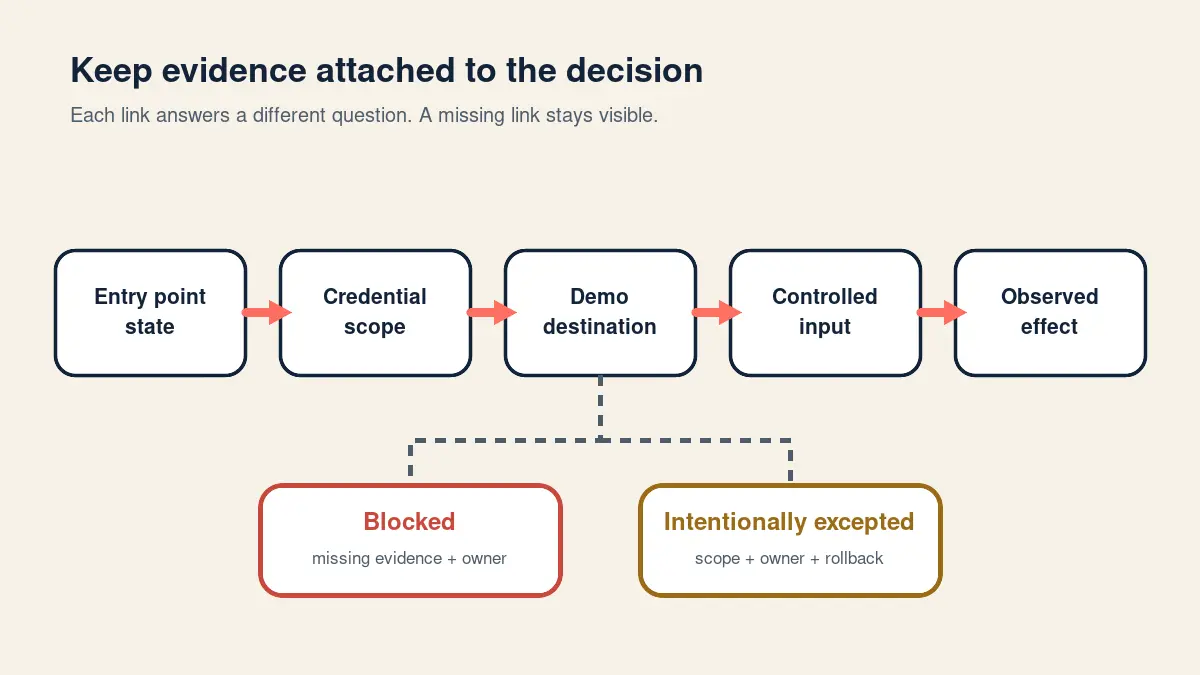
Read the evidence boundary map as a planning aid
Entry point → publication or registration evidence → credential scope → resolved demo destination → controlled input → observed effect and visibility limits.
Missing destination or registration evidence → blocked. Documented intentional departure → intentionally excepted. Complete relevant evidence → ready for the specified test, with its stated limits.
The map organizes a review; it does not establish runtime isolation by itself.
Decision states
An unknown writable destination or registration blocks the relevant test. Do not use an exception label to imply that an unknown has been resolved. Readiness is specific to an entry point and scope, not a permanent property of the whole instance.
| Decision state | Required record | What it permits |
|---|---|---|
| Ready | Relevant prerequisites resolved, named demo destinations established, test input and observation plan recorded | The specified bounded test. Add its observed result afterward. |
| Blocked | Missing evidence, owner and affected operation identified | Further inspection or repair that does not cross the unresolved execution boundary |
| Intentionally excepted | Named departure, accountable owner, authorized scope, rollback target and review date | Only the explicitly authorized exception. It does not prove isolation. |
Questions teams ask before testing staging
Can an unpublished workflow still perform a real action?
Unpublished does not mean every execution path is unavailable. n8n documents direct CLI execution of a saved workflow by ID, and a restored backup can retain credential material. Resolve destinations before any proposed execution, including a manual rehearsal. Official n8n CLI documentation, Official n8n backup documentation.
Does a Git pull always leave workflows unpublished?
No. The official documentation says that pulling changes into a published workflow unpublishes it during the pull and then republishes it. Review dependencies before pulling and inspect the resulting state afterward. Official n8n documentation: Push and pull changes.
Does the Test URL make downstream actions safe?
No. The documented Test URL selects a test listener with a 120 second window after Listen for test event. It does not establish which accounts or recipients downstream actions use. Map those destinations separately. Official n8n documentation: Webhook workflow development.
Can I use this review without built in source control?
Yes. The entry point inventory, destination mapping and evidence worksheet also apply to restore and import reviews. The Server CLI requires self-hosted access; built in source control and environments is documented for Business and Enterprise plans. Choose only the procedure available to your installation. Official n8n CLI documentation, Official n8n source control tutorial.
How long should I observe a schedule before testing?
Choose an observation period using the configured interval, recorded timezone and registration evidence for that schedule. No fixed number of hours proves isolation. Waiting also cannot replace destination mapping. Record what the chosen period can reveal and what remains unobserved. Use the documented workflow timezone, instance default and New York with EDT fallback chain when resolving the actual settings. Official n8n documentation: Workflow timezone settings.
What should block a test even when the workflow looks inactive?
An unresolved writable destination, credential account, provider registration, callback owner or indirect execution dependency should block the relevant test. Relevant queued or running work with unknown behavior is also a blocker. Publication appearance cannot answer those questions. Record the missing evidence and owner instead of granting approval from a label or export field. The documented direct execution path and environment-specific values explain why those checks remain necessary. Official n8n CLI documentation, Official n8n environment documentation.
Keep the evidence with the staging workflow
Review n8n staging production triggers in the order that determines whether testing may proceed: identify the transfer route, contain execution, inventory entry points, map actual destinations, resolve provider questions and record bounded rehearsal evidence. Keep the worksheet with the reviewed workflow so the next operator can distinguish documented configuration from observed behavior.
If the automation's scope is still unclear, use the first automation checklist to define its inputs, actions and ownership. The n8n tool profile provides product context. For subsequent review and upkeep, use the guide to maintaining automations.
Revisit the worksheet when publication, credentials, destination expressions, registrations or referenced workflows change. Retain the observation limits alongside successful receipts. Our two successful local manual runs established matching delivery to one private synthetic receiver for their recorded inputs; they did not certify every trigger or deployment mode.
For help reviewing a defined staging isolation boundary, request a review. Describe the transfer method, affected entry points and unresolved evidence so we can focus on the decision that is blocking your test.
Scroll the table sideways to read every column.
| Worksheet field | What to record |
|---|---|
| Instance and workflow | Instance identity, installed version, deployment mode, transfer method, workflow ID and reviewed version |
| Entry point evidence | Publication state plus one row per schedule, polling trigger, app event, webhook or direct execution path |
| Authority and destination | Actual credential account and scope, plus each resolved demo account, recipient or endpoint |
| Controlled test | Synthetic input, expected demo effects, prohibited production effects, observation period and stop condition |
| Decision | Ready, blocked or intentionally excepted, with owner, rollback target, review date and unresolved questions |
Sources to check next
- n8n Docs: Use the command line
- n8n Docs: Back up and restore
- n8n Docs: Source control environment tutorial
- n8n Docs: Push and pull changes
- n8n Docs: Work with environments
- n8n Docs: Webhook workflow development
- n8n community staging-trigger suppression proposal
- n8n webhook credential documentation
- n8n workflow settings documentation
- DailyAi.Studio: How I Deploy N8N Workflows & Lessons Learned
Vendor features and prices change. Confirm details on the linked official pages before you rely on them.
What to read next
- Automation monitoring checklist: verify completed work
- Your first business automation: a checklist
- n8n: automation features and setup