Appointment reminder workflow: consent, timing and replies
Build an appointment reminder workflow with clear consent checks, timezone rules, reply handling and human follow up. Includes a state map and worksheet.
Guide by the Otomatzia editorial team · checked against official sources on
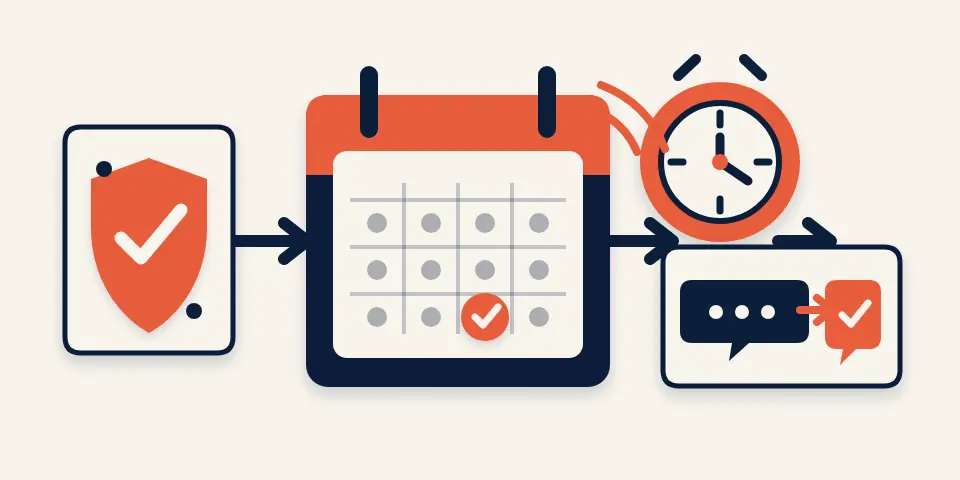
Can I personalize reminders and still approve every send?
Yes. An appointment reminder workflow can prepare a personalized draft from an appointment record, place it in a review queue and require a person to approve the send. Manual approval is a useful starting control, but it does not replace permission, suppression, timezone or appointment-status checks.
This guide proposes a state map and acceptance worksheet. It does not describe an Otomatzia customer implementation, and the proposed cases have not been run as customer appointment tests.
Start with drafts and a review queue
Start by generating a draft rather than sending automatically. Show the recipient, appointment identity, current revision, destination, channel, permission status, message purpose, displayed time and reason the reminder is eligible. The approver should be able to approve, reject or route the item without editing hidden state. One small-business owner reported that manually preparing deposit details, confirmations and reminders was time-consuming and easy to mix up, while semi-automation was acceptable Reddit r/automation original post, 2025-09-10, B006. That is one attributed report, not evidence of cost, demand or a general result.
Separate deposits, confirmations and reminders
Treat each purpose as a separate workflow outcome. A deposit request may need payment context, a confirmation may ask for a response and a reminder may restate an appointment. If content changes purpose, return it to the eligibility gate instead of inheriting approval from another message type.
Choose who receives the reminder and who owns the follow up
The recipient and operational owner are different fields. A customer reminder needs a permission decision, while an internal task needs a staff assignee and a closure rule. Delivery to staff does not prove that a customer message was eligible or handled.
| Workflow row | Recipient | Operational owner | Closure evidence |
|---|---|---|---|
| Customer reminders | Team decision: eligible customer destination | Team decision: customer-communications owner | Team decision: approved outcome and evidence |
| Personal calendar alerts | Calendar owner in the live Tiger Media service | Service owner | Outbound success and recorded send |
| Internal preparation alerts | Assigned staff member | Team decision: preparation owner | Team decision: artifact or closed task |
| Staff tasks | Staff assignee in one Curogram setup example | Staff handling replies or exceptions in that example | Staff resolution in that example |
Customer messages and staff tasks have different outcomes
Curogram's setup guide gives one vendor example in which staff handle confirmation and cancellation replies, manual exceptions and failed deliveries Curogram vendor setup guide, accessed 2026-10-23, B005. Your team still has to decide the customer-reminder recipient, owner and closure evidence.
What a live meeting reminder service does and does not prove
At Tiger Media we built and put into live operation a calendar-to-WhatsApp meeting reminder service. It checks the calendar, chooses a warning pattern from meeting context and can include a preparation-page link when one exists. This shows that a deterministic personal alert can operate, not that a customer appointment workflow has verified consent, reply handling or customer outcomes.
Map the states before choosing a sending tool
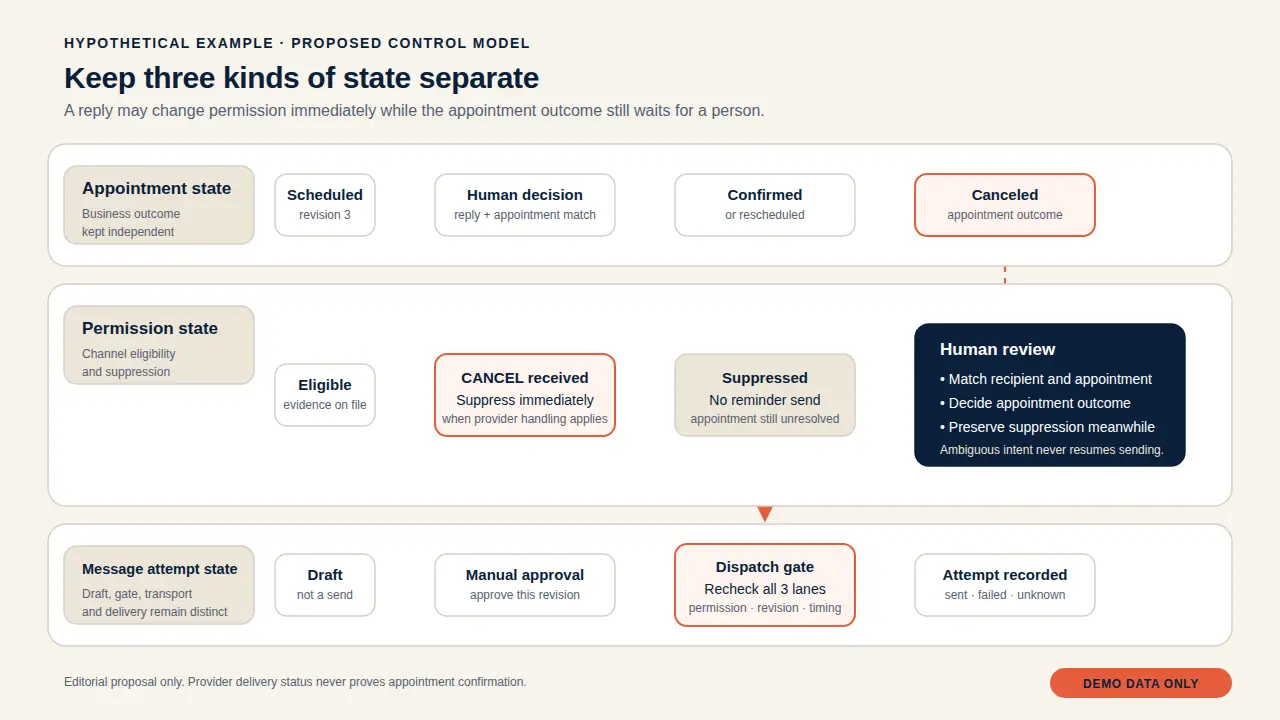
A useful state map keeps appointment state, recipient permission and message attempts in separate lanes. A reply may change permission while leaving the appointment unresolved. A callback may change an attempt without confirming attendance.
- Create the appointment lane from the current record and revision.
- Create the permission lane from channel evidence and provider suppression.
- Create an attempt only when both lanes allow the purpose.
- Hold the attempt when any required field is unresolved.
- Apply provider suppression before classifying appointment meaning.
Appointment state
Use business-defined outcomes such as pending, confirmed, rescheduling requested and canceled. In iCalendar, VEVENT defines TENTATIVE, CONFIRMED and CANCELLED, while SEQUENCE increases for significant revisions RFC 5545, sections 3.8.1.11 and 3.8.7.4. Those values do not decide how to interpret free text.
Permission state
Permission needs its own states, including eligible, application-suppressed, provider-suppressed and review required. For Twilio long code numbers with keyword handling active, CANCEL is a documented opt-out keyword Twilio, Advanced Opt-Out, sections Configuring Advanced Opt-Out keywords and Editing the Opt-out keywords. Provider suppression applies immediately; appointment interpretation can wait.
Message attempt state
Track each attempt separately. Twilio documents accepted, scheduled, queued, sending, sent, failed, delivered, undelivered, read and canceled, with canceled defined for a scheduled message that has been canceled Twilio, Messages resource, status property. That value describes a message, not an appointment.
Record permission and suppression before scheduling
Store permission as evidence, not as a reusable yes-or-no flag. Record the recipient, destination, channel, purpose, scope, source, timestamp, suppression state and review owner. Recheck before scheduling and dispatch.
- Capture permission evidence for the destination, channel and purpose.
- Check application and provider suppression.
- Cancel affected scheduled attempts when a stop is recognized.
- Route unclear revocation wording to review without delaying suppression.
- Require fresh eligibility after a later opt-in.
Separate service messages from promotional content
The UK ICO lists an appointment reminder as a service message when its purpose is administrative or customer service. It warns that promotional material inside a service message is direct marketing and the relevant rules apply Information Commissioner's Office, Identify direct marketing, section What are service messages?. Keep administrative templates free of promotional additions unless that purpose has been reviewed.
Record the scope of each stop request
Rules vary by jurisdiction, sender, channel and purpose. As a bounded US example, FCC 24-24 says consumers may revoke consent by any reasonable means and lists STOP, QUIT, END, REVOKE, OPT OUT, CANCEL and UNSUBSCRIBE Federal Communications Commission, FCC 24-24, paras. 16-20. Check current applicability before adopting a rule. With Twilio Advanced Opt-Out, a matched keyword is classified before the webhook and Twilio sends its own confirmation; it recommends that the application not send another message Twilio, Advanced Opt-Out, section Keeping track of your users' status. Record the provider event and application decision.
Review eligibility again after an opt in
An opt-in can remove a provider block without proving that old reminders should return. TherapyNotes documents per-phone consent, STOP and START behavior for its product TherapyNotes support documentation, accessed 2026-10-23, B002. Re-evaluate the revision, purpose, destination and permission evidence before creating a new sequence.
Set four timezone rules instead of one
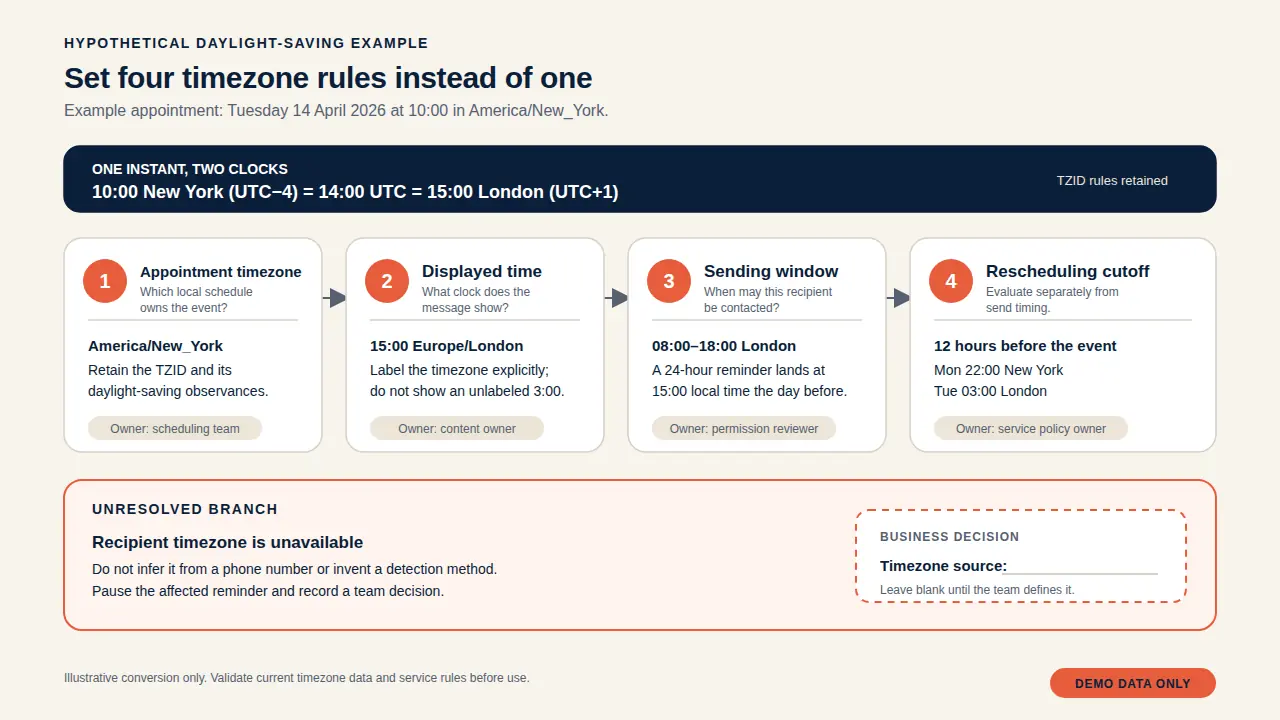
Timezone handling has separate decisions for the appointment, displayed time, sending window and rescheduling cutoff. Leaving one implicit can make an appointment appear at the wrong time or a valid request look late.
| Time decision | Required input | Team rule | Observed result |
|---|---|---|---|
| Appointment timezone | Source time and named zone or floating-time policy | Preserve source meaning | Blank until exercised |
| Displayed time | Recipient, business and appointment zones | Choose and label a zone | Blank until exercised |
| Sending window | Known recipient zone and fallback | Block, defer or review | Blank until exercised |
| Rescheduling cutoff | Appointment instant, current instant and cutoff zone | Evaluate separately | Blank until exercised |
Choose the appointment timezone
Retain a named timezone when the source provides one. RFC 5545 distinguishes floating local time, UTC marked with a Z suffix and local time linked by TZID to a timezone definition RFC 5545, sections 3.3.5 and 3.3.12. A floating value does not name the recipient's or business's zone.
Choose the time shown in the message
Decide whether the message displays the appointment, business or recipient zone, and label it when confusion is possible. DrChrono documents a product-specific choice between provider and patient timezone, including an individual provider override DrChrono support documentation, accessed 2026-10-23, B003. That is not a universal default.
Set the recipient sending window
Define which known timezone controls the send window and what happens when unavailable. TherapyNotes documents SMS reminders between 24 and 2 hours before an appointment and sends from 08:30 through 21:00 in the recipient timezone, falling back to the practice timezone TherapyNotes support documentation, accessed 2026-10-23, B002. Those values apply only to TherapyNotes.
Evaluate the rescheduling cutoff separately
Calculate the cutoff from the same appointment instant and timezone assumptions used by the rescheduling system. One Easy!Appointments issue reported rejection when the appointment was 4 hours away despite a 30-minute cutoff; it was closed on 2026-02-16 Easy!Appointments issue 1789 and discussion, opened 2025-09-23, closed 2026-02-16, B007. Treat this as one closed report and a reason to test.
Schedule only eligible appointment revisions
Scheduling should use the current eligible revision, not a remembered appointment time. Keep a pre-dispatch gate even after a provider accepts a future send. Acceptance does not prove that the appointment, permission or destination remains valid.
- Select a stage from service rules and provider limits.
- Bind it to the appointment identity and revision.
- Recheck status, permission, suppression and destination.
- Retire the attempt when the record no longer matches.
- Route late booking to fallback, review or no-send.
Choose reminder stages for your service
Choose stages from service needs and provider limits. Twilio's scheduling API requires an ISO 8601 UTC timestamp and permits scheduling between 15 minutes and 35 days before sending Twilio, Message Scheduling. Those limits do not apply to every channel. At Tiger Media, the live meeting reminder service uses different warning patterns for physical-address meetings and calls or meetings without one. This can inform design, but it does not establish timing for customer appointments.
Recheck eligibility before dispatch
At Tiger Media, the live service skips canceled or declined events, suppresses duplicates by event identity with start time and records a reminder only after outbound success. A customer workflow should add permission, recipient and purpose checks.
Handle bookings that miss the normal window
Define a safe outcome when an earlier stage has passed. At Tiger Media, a late short-warning fallback was added for travel meetings after an earlier window was missed. That supports a late-booking branch, not a rule that every missed stage should send immediately.
Classify replies before deciding what stops
Pause affected application reminders while matching a reply, but do not delay immediate provider suppression. Reply classification and appointment resolution need different decisions.
| Reply class | Immediate action | Appointment action | Owner |
|---|---|---|---|
| Provider-recognized opt out | Suppress and cancel affected attempts | Leave unresolved | Permission owner, then appointment owner |
| Other clear revocation | Apply proposed suppression and review scope | Leave unresolved | Permission owner |
| Cancellation request | Pause affected reminders | Match and decide cancellation | Appointment owner |
| Confirmation | Pause incompatible reminders | Apply defined outcome | Appointment owner |
| Rescheduling request | Pause candidate reminders | Match and start rescheduling | Appointment owner |
| Ambiguous reply | Pause safely matched scope | No automatic change | Exception owner |
Pause affected reminders while matching the reply
Twilio sends MessageSid, From, To and Body to an incoming-message webhook, allowing an application to connect a reply to a recipient and workflow Twilio, Twilio's request to your incoming message Webhook URL. Matching still needs rules for shared destinations, several appointments and unclear text.
Preserve provider suppression while resolving intent
For supported Twilio long code handling, CANCEL is a documented opt-out term and suppression applies regardless of whether a person later cancels the appointment Twilio, Advanced Opt-Out, sections Configuring Advanced Opt-Out keywords and Editing the Opt-out keywords. Do not lift suppression because the appointment remains active.
Send uncertain matches to a person
Unrecognized wording, several candidates or conflicting permission and intent should create an exception. Curogram identifies unrecognized replies and manual exceptions in one setup Curogram vendor setup guide, accessed 2026-10-23, B005. Name the person who makes the match.
Invalidate old reminders when appointments change
At Tiger Media, a moved meeting is reconsidered at its new time and duplicate suppression uses event identity with start time. Extend that pattern with revision-aware invalidation so an old reminder cannot remain eligible merely because it was created earlier.
- Detect a changed identity, revision or start time.
- Retire attempts for the previous revision.
- Request provider cancellation where supported.
- Record the response and in-flight attempts.
- Rebuild eligibility from the new revision.
Retire reminders for the previous revision
When significant fields change, mark pending attempts for the previous revision ineligible. RFC 5545's SEQUENCE provides a revision signal for changes including DTSTART, DTEND, DURATION or recurrence RFC 5545, sections 3.8.1.11 and 3.8.7.4. Other sources need an equivalent revision or comparison rule.
Record cancellation results
Cancellation has its own result. Twilio documents canceling a scheduled message before send by updating its status to canceled and says remaining scheduled messages can be canceled after an opt out Twilio, Message Scheduling; Twilio, Messages resource. Record whether each cancellation was accepted.
Reconcile a change that arrives during sending
A revision can arrive after the eligibility read but before the outbound result. Retain the old attempt, link it to the new revision and decide whether human follow up is needed. Do not claim prevention if dispatch started.
Track delivery without confusing it with confirmation
Delivery tracking answers what the provider reports about an attempt. A delivered status alone does not establish that the recipient read the content. Keep any separately reported read status distinct from attendance confirmation and permission.
- Create an immutable attempt before requesting the send.
- Attach callbacks to the provider identifier.
- Reconcile transitions without assuming order.
- Review failed and undelivered outcomes before retry.
- Convert suppression errors into permission changes.
Record each attempt and provider identifier
Store the internal attempt identity, appointment revision, destination, provider identifier, purpose, approval and latest status. This gives a traceable record without turning delivery into an appointment outcome.
Reconcile callbacks without assuming arrival order
Twilio exposes MessageStatus and ErrorCode and warns that callbacks are not guaranteed to arrive in order because latency varies Twilio, Track the Message Status of Outbound Messages, section How are status callback requests sent?. Preserve events and compare valid transitions rather than overwriting by arrival time.
Review failures before retrying
Twilio error 21610 indicates that the recipient opted out from the sender or Messaging Service. Twilio says that sender cannot message the number until the recipient responds with START Twilio, Error 21610, modified 11 March 2026. Treat it as suppression, not a transient failure, and do not switch channels automatically.
Give human exceptions an owner and a closure rule
Automation should stop when the recipient, appointment, permission or reply match is uncertain. An exception queue is useful only when each item has an owner, next action and closure evidence.
- Assign a named person or role.
- Preserve ambiguous input and candidates.
- State permitted and blocked actions.
- Record evidence before release.
- Recheck the current revision.
Define the minimum review record
Preserve the source event, candidate appointment, destination, paused actions, current states, uncertainty and evidence. Set a locally chosen response target; the dossier provides no benchmark. One Curogram guide discusses staff handling replies, exceptions and failed deliveries Curogram vendor setup guide, accessed 2026-10-23, B005.
Keep reminders paused until the case is resolved
Closure should state the decision, owner, appointment, destination and whether a reminder may be rebuilt. Viewing a task is not closure. If evidence is unavailable, retain suppression and leave the appointment unchanged.
Keep message content useful and appointment specific
Use the minimum detail needed for the administrative purpose, show an unambiguous time and provide an available action. Data minimization here is design guidance. Legal and security owners should decide what is appropriate.
- Name the service only as specifically as needed.
- Include a labelled time and timezone.
- Include an action without promotion.
- Exclude internal notes and unrelated fields.
- Resolve conflicting data before approval.
Keep promotional content out of administrative templates
The ICO distinguishes administrative reminders from direct marketing and warns that promotional content can change that treatment Information Commissioner's Office, Identify direct marketing, section What are service messages?. Keep the template tied to the appointment purpose. A hypothetical draft could say: `Reminder: your appointment is at [displayed local time and zone]. Reply using the supported option or contact [team channel] if the details are wrong.` Populate placeholders from the current eligible record.
Resolve conflicting location details
Define precedence when an event contains a street address, conference metadata and notes. At Tiger Media, attached conference metadata once overrode a valid street address and produced the shorter warning. The classifier was changed so a street address wins, supporting explicit precedence.
Avoid unnecessary sensitive information
Do not include information merely because the source exposes it. Choose fields by purpose and recipient need, and let the approver see what will leave the system. Omit unclear fields and route the template for review.
Validate the state map before enabling customer messages
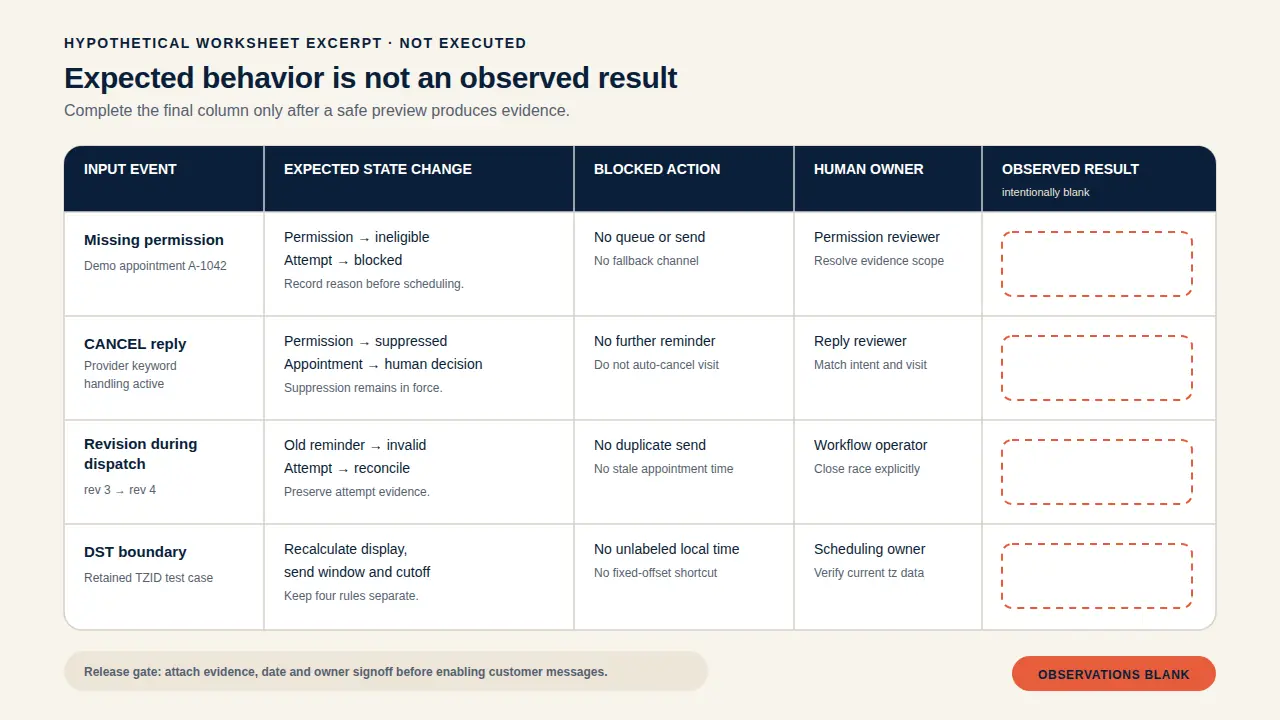
Use a safe preview to exercise expected transitions without sending customer messages. Separate planned input, expected state, blocked action, owner, observed result and evidence. Leave observed fields blank until an exercise produces evidence.
The first automation checklist can support the preview, while monitoring and ownership should be assigned before release. After completing the appointment reminder state map and acceptance worksheet, discuss a bounded project with Tiger Media.
- Prepare synthetic records for each case.
- Run the preview with customer delivery disabled.
- Capture the draft, state changes and blocked actions.
- Compare observed and expected results.
- Obtain signoff after evidence is attached.
| Acceptance case | Expected change | Blocked action | Owner | Observed result |
|---|---|---|---|---|
| Approval withheld | Attempt remains pending | Customer send | Approver | Blank until exercised |
| Permission missing | Permission needs review | Scheduling and dispatch | Permission owner | Blank until exercised |
| Opt-out received | Permission is suppressed | Affected reminders | Permission owner | Blank until exercised |
| Appointment revised | Previous attempts retire | Old dispatch | Appointment owner | Blank until exercised |
| Ambiguous reply | Candidate reminders pause | Automatic change | Exception owner | Blank until exercised |
| Callback disorder | Events reconcile by valid transition | Blind overwrite | Delivery owner | Blank until exercised |
| Source unavailable | Review or no-send | Draft and dispatch | Source owner | Blank until exercised |
Define the expected state and blocked actions
Include permission, opt-out, opt-in, appointment change, cancellation, confirmation, ambiguous reply, multiple appointments, late booking, duplicate event, callback disorder, unknown delivery, daylight-saving change and unavailable source data. State which lane changes and which send remains blocked.
Exercise the cases in a safe preview
Use synthetic recipients and hypothetical appointments. Show the draft, transition, owner and blocked action without calling the customer channel. Test duplicate handling against avoiding duplicate records, and preserve evidence instead of reporting an assumed pass.
Record observed results before release
Compare observed and expected state, then record the reviewer. A blank result means not executed, not passed. Any mismatch returns to the state map before customer messaging is enabled.
Questions about cost, tools, timezones and stop rules
These answers keep tool behavior, timezone rules and provider suppression scoped to the documented product or standard. Confirm the current behavior in your own configuration before enabling customer messages.
Can I start without buying another platform?
Yes, if existing systems can produce drafts, expose state and support review. One owner asked for affordable generation and accepted semi-automation, but did not establish a price or universal tool requirement Reddit r/automation original post, 2025-09-10, B006. Compare your source with the Calendly profile without assuming it supplies this workflow.
Why does the rescheduling link say it is too late?
The cutoff may use a different timezone or instant from the displayed reminder. One closed Easy!Appointments issue reported that behavior with an appointment 4 hours away and a 30-minute cutoff Easy!Appointments issue 1789 and discussion, opened 2025-09-23, closed 2026-02-16, B007. Keep the result blank until you test your configuration.
Does daylight saving preserve the usual local time?
A retained TZID with observances can preserve recurring local-time meaning; a reused fixed UTC offset cannot represent those changes. RFC 5545 describes STANDARD and DAYLIGHT observances RFC 5545, sections 3.6.5 and 3.8.3.1. Zanda documents an example where Melbourne stays at 10:00 while Brisbane changes to 09:00 Zanda support documentation, daylight saving example, accessed 2026-10-23, B004.
What does a START reply change?
It can remove a documented provider block, but should not restore canceled attempts automatically. For Toll-Free US numbers messaging to or from the US or Canada, Twilio says only START and UNSTOP fully remove its block Twilio, Advanced Opt-Out, sections Editing the Opt-out keywords, Edit the Opt-in keywords, and Special behavior for Toll-Free numbers. Decide separately whether to create a fresh eligible sequence.
Takeaways and evidence boundaries
The safe planning outcome is a state map with explicit unknowns, not a claim that the workflow passed customer use. Complete the worksheet with evidence before enabling customer messages.
- Start with draft generation and manual approval.
- Block sends when permission, suppression or appointment state is unresolved.
- Recheck the revision before dispatch and retire old attempts.
- Route ambiguity, failed delivery and unavailable data to named owners.
- Enable customer messages only after observed evidence is recorded.
Keep appointment, permission and delivery states separate
An opt-out can suppress messaging while the appointment remains unresolved. A delivered message can leave attendance unknown. Separate lanes prevent one provider event from changing unrelated business state.
Verify the documented limits before implementation
Check the current jurisdiction, sender, channel, provider and calendar behavior. Product documentation supports named behavior only, and forum posts or issues remain attributed reports.
Use the worksheet to record what remains unproven
Expected results are plans. Observed results require a safe exercise, evidence and owner signoff. Keep blank fields blank until that work is complete.
Scroll the table sideways to read every column.
| Acceptance case | Expected change | Blocked action | Owner | Observed result |
|---|---|---|---|---|
| Approval withheld | Attempt remains pending | Customer send | Approver | Blank until exercised |
| Permission missing | Permission needs review | Scheduling and dispatch | Permission owner | Blank until exercised |
| Opt-out received | Permission is suppressed | Affected reminders | Permission owner | Blank until exercised |
| Appointment revised | Previous attempts retire | Old dispatch | Appointment owner | Blank until exercised |
| Ambiguous reply | Candidate reminders pause | Automatic change | Exception owner | Blank until exercised |
| Callback disorder | Events reconcile by valid transition | Blind overwrite | Delivery owner | Blank until exercised |
| Source unavailable | Review or no-send | Draft and dispatch | Source owner | Blank until exercised |
Sources to check next
- In the Matter of Rules and Regulations Implementing the Telephone Consumer Protection Act of 1991, FCC 24-24
- Identify direct marketing
- Customize users' opt-in and opt-out experience with Advanced Opt-Out
- Track the Message Status of Outbound Messages
- Message Scheduling
- RFC 5545: Internet Calendaring and Scheduling Core Object Specification (iCalendar)
- Messages resource
- Twilio's request to your incoming message Webhook URL
- Does my time zone affect the appointment reminders?
- Automated Patient Appointment Reminders
- Time Zones in Appointment Reminders
- Sending Appointment Reminders in your Clients' Time Zone
- Automated Appointment Reminders: Complete Guide (2026)
- Is it possible to schedule multiple SMS reminders for each customer without paying for expensive software?
- Cannot modify appointment if provider changes time zone
- SMS Appointment Reminders
- How to Build Appointment Reminder Workflows in HighLevel
- Changed appointment to day earlier keeps old reminders.
- Frequently Asked Questions
- 21610: Attempt to send to unsubscribed recipient
Vendor features and prices change. Confirm details on the linked official pages before you rely on them.
What to read next
- Automation monitoring checklist: verify completed work
- Prevent duplicate CRM records when automations retry
- Calendly: scheduling with workflows, webhooks and integrations
- Your first business automation: a checklist